# How to Display Formatted Date in JavaScript Without Using Any External Library
In most of the applications, we need to display a formatted date like 18 June 2021 or 06/18/2021 along with the time.
So we normally use moment.js or date-fns or day.js library to get that done.
But using an external library adds a lot of extra code to the final size of the application.
For example, the [moment.js npm](https://www.npmjs.com/package/moment) library is about 4.21MB in unpacked size.
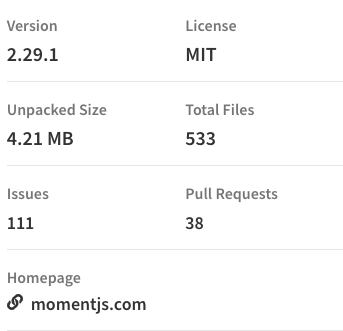
So even If you use it only once for single formatting, your final application bundle size will increase which will affect your application loading time.
**Also, Moment.js is now a [legacy project](https://momentjs.com/docs/)(in maintenance mode) from Oct 2020. **
So in this article, we'll see how to display the date in a formatted way using just JavaScript without using any external libraries.
So let's get started.
## Using Date.prototype.toLocaleDateString
It has the following syntax:
```
toLocaleDateString(locales, options)
```
The toLocaleDateString method accepts a set of options and returns a date portion of the given Date instance according to language-specific conventions.
* locales can take en-US, en-GB etc which is a language specific code.
* options is an object where we specify which part of date we want like date, year, month etc.
## Get Only Date
```js
const date = new Date().toLocaleDateString('en-US');
console.log(date); // 6/18/2021
```
## Get Formatted Date
```js
const date = new Date().toLocaleDateString('en-US', {
year: 'numeric',
month: 'long',
day: 'numeric'
});
console.log(date); // June 18, 2021
```
## Get Date and Time
```js
const date = new Date().toLocaleDateString('en-US', {
hour: 'numeric',
minute: 'numeric'
});
console.log(date); // 6/18/2021, 10:30 AM
```
## Get Formatted Date and Time
```js
const date = new Date().toLocaleDateString('en-US', {
year: 'numeric',
month: 'long',
day: 'numeric',
hour: 'numeric',
minute: 'numeric'
});
console.log(date); // June 18, 2021, 10:30 AM
```
## Get Formatted Date and Time Including Seconds
```js
const date = new Date().toLocaleDateString('en-US', {
year: 'numeric',
month: 'long',
day: 'numeric',
hour: 'numeric',
minute: 'numeric',
second: 'numeric'
});
console.log(date); // June 18, 2021, 10:30:54 AM
```
## Get Formatted Date and Time Including Weekday
```js
const date = new Date().toLocaleDateString('en-US', {
weekday: 'long',
year: 'numeric',
month: 'long',
day: 'numeric',
hour: 'numeric',
minute: 'numeric',
second: 'numeric'
});
console.log(date); // Friday, June 18, 2021, 10:30:52 AM
```
The possible options values are as shown below:
* weekday: long, short, narrow
* era: long, short, narrow
* year: numeric, 2-digit
* month: numeric, 2-digit, long, short, narrow
* day: numeric, 2-digit
* hour: numeric, 2-digit
* minute: numeric, 2-digit
* second: numeric, 2-digit
* timeZoneName: long, short
### Thanks for reading!
Check out my recently published [Mastering Redux](https://master-redux.yogeshchavan.dev/) course.
In this course, you will learn:
* Basic and advanced Redux
* How to manage the complex state of array and objects
* How to use multiple reducers to manage complex redux state
* How to debug Redux application
* How to use Redux in React using react-redux library to make your app reactive.
* How to use redux-thunk library to handle async API calls and much more
and then finally we'll build a complete [food ordering app](https://www.youtube.com/watch?v=2zaPDfCKAvM) from scratch with stripe integration for accepting payments and deploy it to the production.
[ ](https://bit.ly/3w0DGum)
**Want to stay up to date with regular content regarding JavaScript, React, Node.js? [Follow me on LinkedIn](https://www.linkedin.com/in/yogesh-chavan97/).**
[
](https://bit.ly/3w0DGum)
**Want to stay up to date with regular content regarding JavaScript, React, Node.js? [Follow me on LinkedIn](https://www.linkedin.com/in/yogesh-chavan97/).**
[ ](https://www.buymeacoffee.com/myogeshchavan97)