# How to Use Debouncing to Improve your Application Search in React
In this article, we will see a very powerful and must-use technique to improve the performance of search functionality in the application.
If we're making an API call to the server for every character typed in the input search box and the data returned by API contains a lot of data, let's say 500 or 1000 user records then it will slow down your application.
Because for every character typed in the search box, we're making an API call and the server may take some time to return data and before the server returns the data we're making another API call for the next character typed.
In almost every application we need to add some form of search functionality may be to filter some records or get the result from API.
> So this is a common scenario and making an API call for every character typed may be expensive because some third-party applications or cloud providers like firebase, AWS, etc provide only a limited number of API requests, and cost is incurred for every additional request.
So to handle this scenario, we can use the debouncing functionality.
Let's first understand what is debouncing.
> Debouncing allows us to call a function after a certain amount of time has passed. This is very useful to avoid unnecessary API calls to the server If you're making an API call for every character typed in the input text.
Let's understand this by writing some code.
## Without Debouncing in class component
```js
import React from 'react';
import axios from 'axios';
import { Form } from 'react-bootstrap';
export default class WithoutDebouncingClass extends React.Component {
state = {
input: '',
result: [],
errorMsg: '',
isLoading: false
};
handleInputChange = (event) => {
const input = event.target.value;
this.setState({ input, isLoading: true });
axios
.get(`https://www.reddit.com/search.json?q=${input}`)
.then((result) => {
this.setState({
result: result.data.data.children,
errorMsg: '',
isLoading: false
});
})
.catch(() => {
this.setState({
errorMsg: 'Something went wrong. Try again later.',
isLoading: false
});
});
};
render() {
const { input, result, errorMsg, isLoading } = this.state;
return (
);
}
}
```
Here's a [Code Sandbox Demo](https://codesandbox.io/s/stupefied-lewin-5lor3?file=/src/App.js).
In the above code, we're displaying a search box where user types some value and we're calling the `handleInputChange` method on the `onChange` event of the input text box.
Inside that method, we're making an API call to `reddit` by passing the search string and we're storing the result in the `results` array in the state and displaying the result as an unordered list.
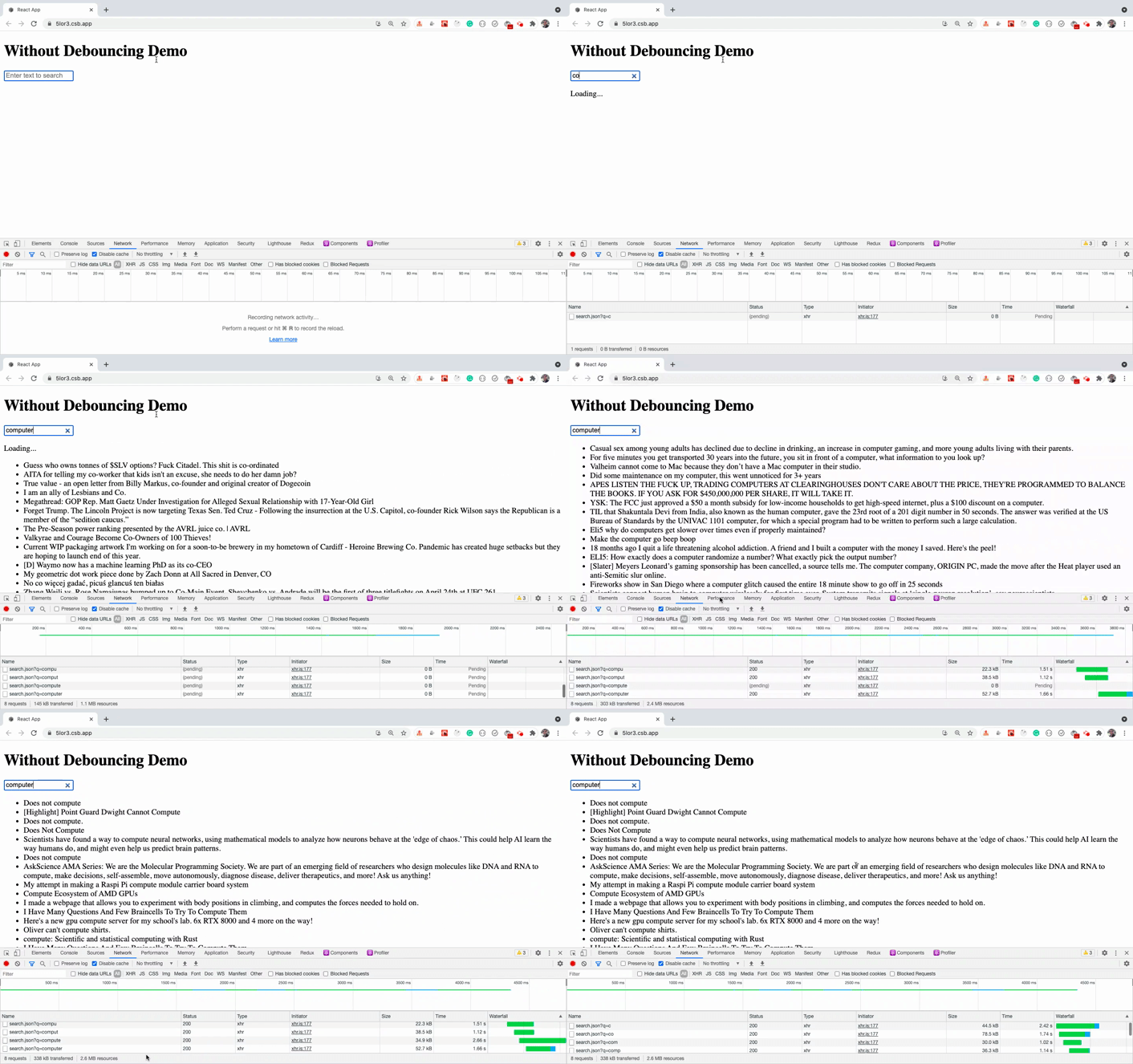
As you can see, on every character typed, we are making an API call. So we are unnecessarily increasing the server API calls.
If the server is taking more time to return the data, you might see the previous result even when you are expecting new results based on your input value.
To fix this, we can use debouncing where we only make an API request after half-second(500 milliseconds) once a user has stopped typing which is more beneficial. It will save from unnecessary requests and will also save from previous API call result being displayed for a short time.
## With debouncing in class component
Here, we will use the `debounce` method provided by [lodash](https://lodash.com/) library to add the debouncing functionality.
```js
import React from 'react';
import axios from 'axios';
import _ from 'lodash';
import { Form } from 'react-bootstrap';
export default class WithDebouncingClass extends React.Component {
constructor(props) {
super(props);
this.state = {
input: '',
result: [],
errorMsg: '',
isLoading: false
};
this.handleSearchText = _.debounce(this.onSearchText, 500);
}
onSearchText = (input) => {
this.setState({ isLoading: true });
axios
.get(`https://www.reddit.com/search.json?q=${input}`)
.then((result) => {
this.setState({
result: result.data.data.children,
errorMsg: '',
isLoading: false
});
})
.catch(() => {
this.setState({
errorMsg: 'Something went wrong. Try again later.',
isLoading: false
});
});
};
handleInputChange = (event) => {
const input = event.target.value;
this.setState({ input });
this.handleSearchText(input);
};
render() {
const { input, result, errorMsg, isLoading } = this.state;
return (
);
}
}
```
Here's a [Code Sandbox Demo](https://codesandbox.io/s/sharp-kirch-5ge3f?file=/src/index.js).
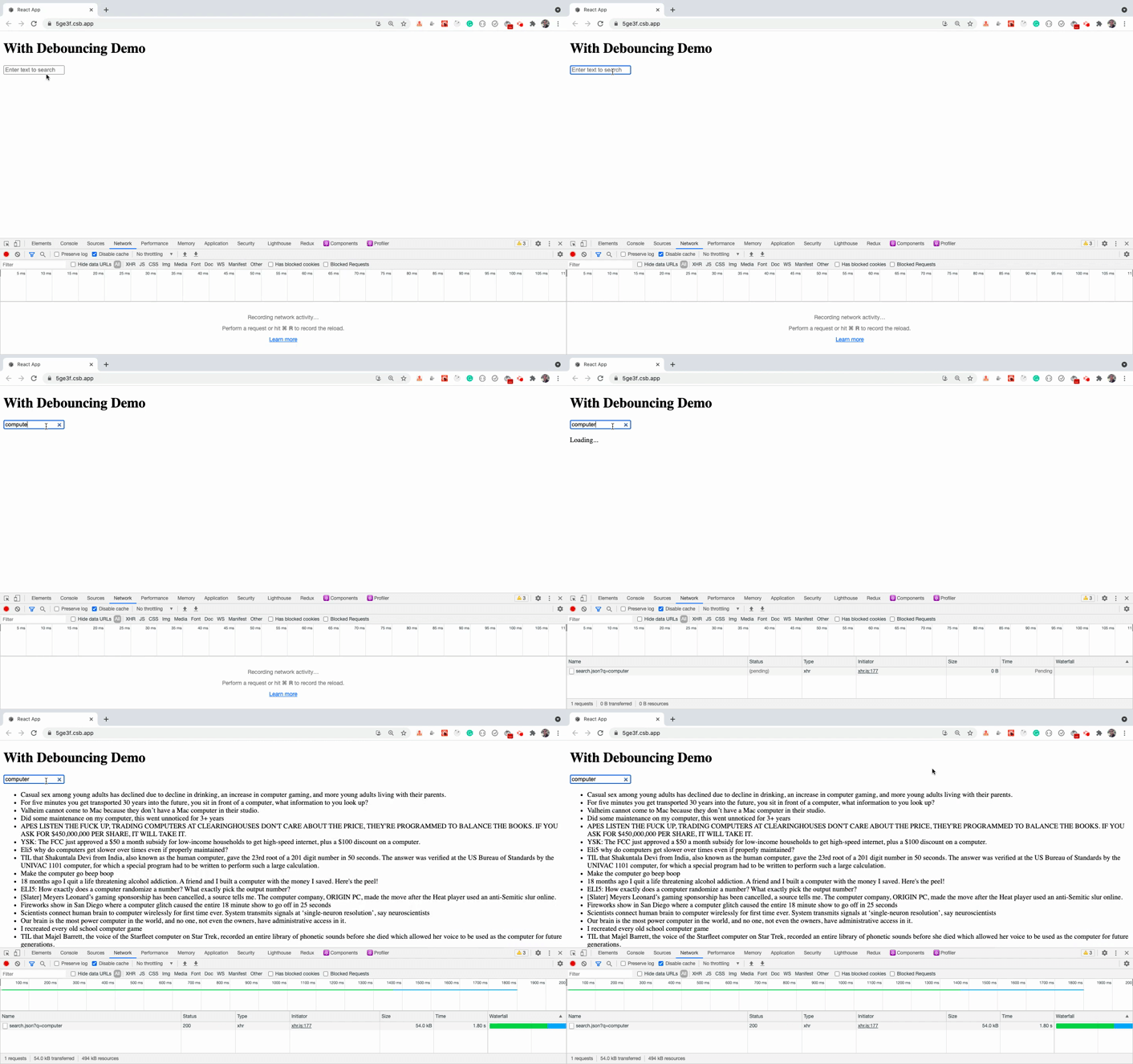
As you can see, with the added debouncing functionality, the API call is only made once after half-second(500 milliseconds) when we stopped typing, thereby reducing the number of API calls and also the result is not flickered and we're getting only the final result which is expected and useful behavior.
The lodash's `debounce` method accepts two parameters.
* A function to execute
* The number of milliseconds to wait before executing the passed function
```js
this.handleSearchText = _.debounce(this.onSearchText, 500);
```
The `debounce` method returns a function which we stored in `this.handleSearchText` class variable and we're calling it in `handleInputChange` handler which gets called when the user types something in the input search textbox.
When we call the `handleSearchText` method, it internally calls the `onSearchText` method where we're making an API call to reddit.
Note that, we're calling the `debounce` function inside the constructor because this initialization needs to be done only once.
Let's see how can we use debouncing when using React Hooks.
## Without Debouncing in React hooks
Let's first write the code without debouncing using hooks.
```js
import React, { useState } from 'react';
import axios from 'axios';
import { Form } from 'react-bootstrap';
const WithoutDebouncingHooks = () => {
const [input, setInput] = useState('');
const [result, setResult] = useState([]);
const [errorMsg, setErrorMsg] = useState('');
const [isLoading, setIsLoading] = useState(false);
const handleInputChange = (event) => {
const input = event.target.value;
setInput(input);
setIsLoading(true);
axios
.get(`https://www.reddit.com/search.json?q=${input}`)
.then((result) => {
setResult(result.data.data.children);
setErrorMsg('');
setIsLoading(false);
})
.catch(() => {
setErrorMsg('Something went wrong. Try again later.');
setIsLoading(false);
});
};
return (
);
};
export default WithoutDebouncingHooks;
```
Here's a [Code Sandbox Demo](https://codesandbox.io/s/long-wind-ogkzh?file=/src/App.js).
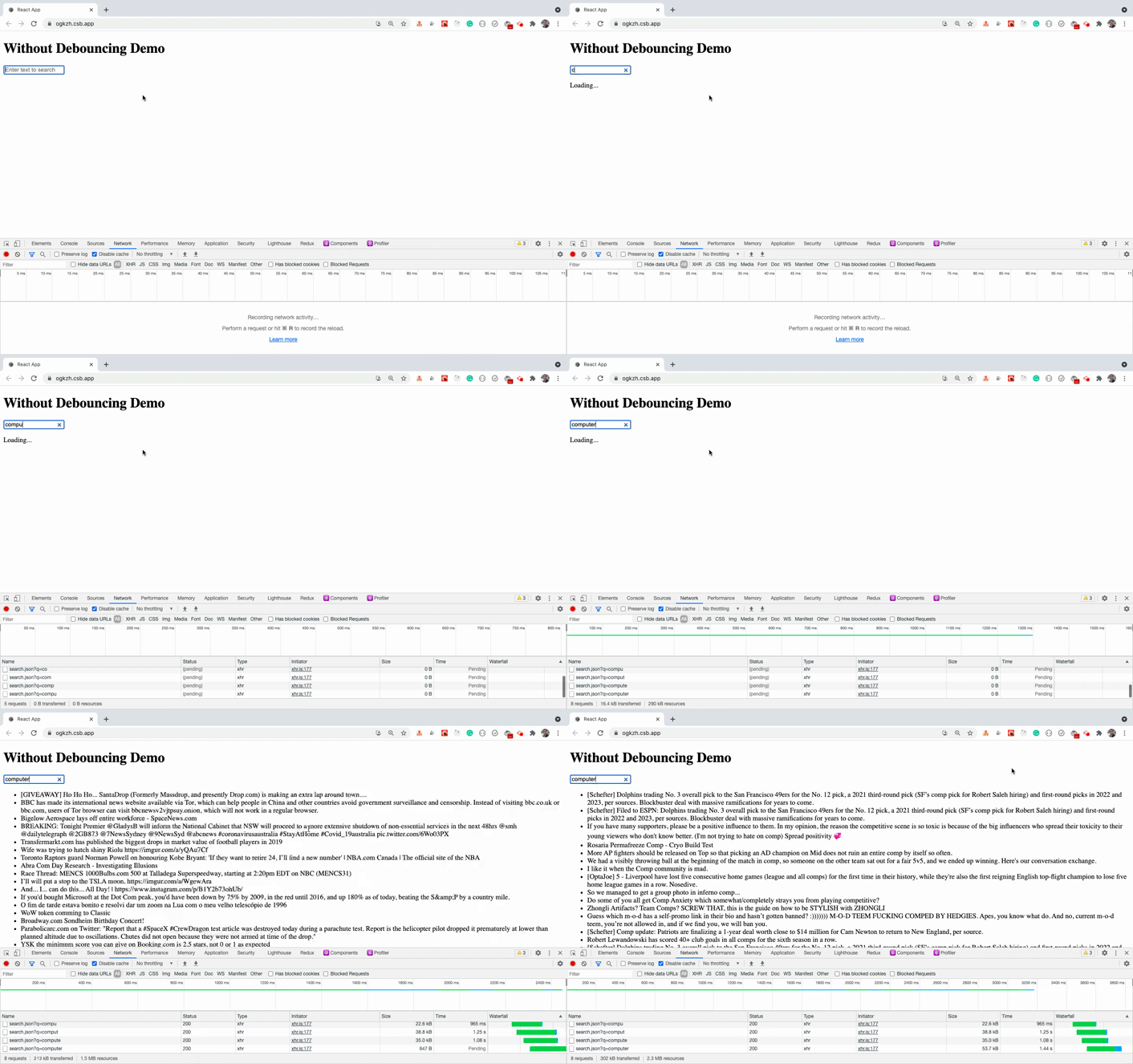
This is the same code of debouncing without class written using hooks.
Let's see how we can add debouncing to this code.
## With debouncing in React hooks
```js
import React, { useState, useEffect, useRef } from 'react';
import axios from 'axios';
import _ from 'lodash';
import { Form } from 'react-bootstrap';
const WithDebouncingHooks = () => {
const [input, setInput] = useState('');
const [result, setResult] = useState([]);
const [errorMsg, setErrorMsg] = useState('');
const [isLoading, setIsLoading] = useState(false);
const inputRef = useRef();
useEffect(() => {
// initialize debounce function to search once user has stopped typing every half second
inputRef.current = _.debounce(onSearchText, 500);
}, []);
const onSearchText = (input) => {
setIsLoading(true);
axios
.get(`https://www.reddit.com/search.json?q=${input}`)
.then((result) => {
setResult(result.data.data.children);
setErrorMsg('');
setIsLoading(false);
})
.catch(() => {
setErrorMsg('Something went wrong. Try again later.');
setIsLoading(false);
});
};
const handleInputChange = (event) => {
const input = event.target.value;
setInput(input);
inputRef.current(input);
};
return (
);
};
export default WithDebouncingHooks;
```
Here's a [Code Sandbox Demo](https://codesandbox.io/s/hopeful-mahavira-b4z8f?file=/src/App.js).
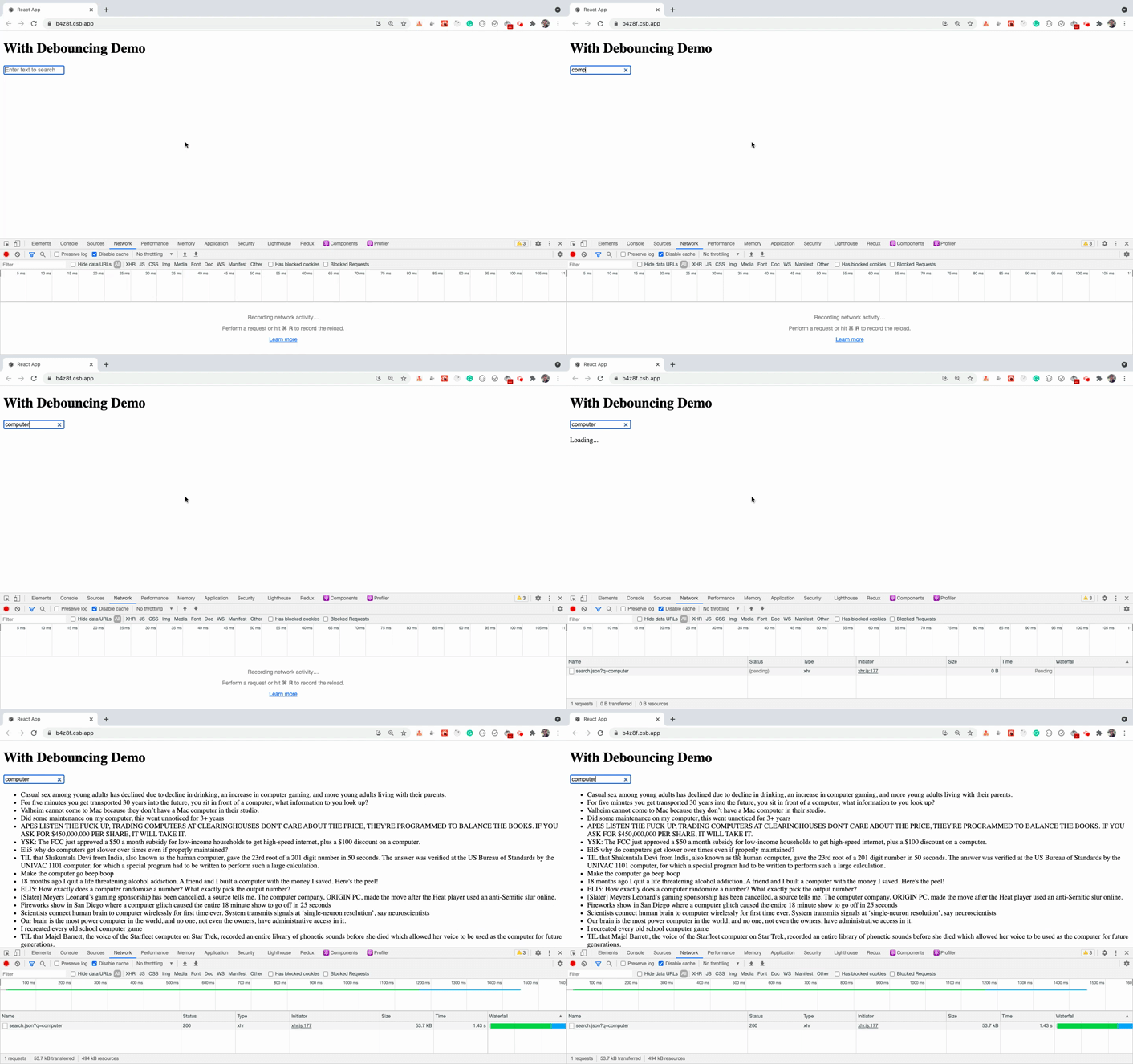
As you can see, only one API call is made when we use debouncing.
In the above code, we're calling the `debounce` function inside the `useEffect` hook by passing an empty array `[]` as a second argument because this code needs to be executed only once.
And we're storing the result of the function in `inputRef.current`. `inputRef` is a `ref` created by calling `useRef()` hook. It contains a `current` property which we can use to retain the value even after the component is re-rendered.
Using the local variable to store the result of `debounce` function will not work because for every re-render of the component previous variables will get lost. So React provided a ref way of persisting data across re-render inside the components using Hooks.
And then inside the `handleInputChange` handler, we're calling the function stored inside the `inputRef.current` variable.
```js
const handleInputChange = (event) => {
const input = event.target.value;
setInput(input);
inputRef.current(input);
};
```
### Thanks for reading!
Want to learn all ES6+ features in detail including let and const, promises, various promise methods, array and object destructuring, arrow functions, async/await, import and export and a whole lot more from scratch?
Check out my [Mastering Modern JavaScript](https://modernjavascript.yogeshchavan.dev/) book. This book covers all the pre-requisites for learning React and helps you to become better at JavaScript and React.
**Check out free preview contents of the book [here](https://www.freecodecamp.org/news/learn-modern-javascript/).**
Also, you can check out my **free** [Introduction to React Router](https://yogeshchavan.podia.com/react-router-introduction) course to learn React Router from scratch.
Want to stay up to date with regular content regarding JavaScript, React, Node.js? [Follow me on LinkedIn](https://www.linkedin.com/in/yogesh-chavan97/).
[ ](https://bit.ly/3w0DGum)
[
](https://bit.ly/3w0DGum)
[ ](https://www.buymeacoffee.com/myogeshchavan97)