# Redux Middleware – What it is and How to Build it from Scratch
In this article, we will explore what is a middleware in Redux, why it's used, and how you can create your own middleware from scratch.
So let's get started.
> Want to learn Redux from scratch and build a full-stack [food ordering app](https://www.youtube.com/watch?v=2zaPDfCKAvM) with stripe payment integration? Check out my [Mastering Redux](https://master-redux.yogeshchavan.dev/) course.
## What Is Redux Middleware?
Redux Middleware allows you to intercept every action sent to the reducer so you can make changes to the action or cancel the action.
Middleware helps you with logging, error reporting, making asynchronous requests, and a whole lot more.
Take a look at the below code:
```js
import React from "react";
import ReactDOM from "react-dom";
import { createStore } from "redux";
const reducer = (state = 0, action) => {
switch (action.type) {
case "INCREMENT":
return state + action.payload;
case "DECREMENT":
return state - action.payload;
default:
return state;
}
};
const store = createStore(reducer);
store.subscribe(() => {
console.log("current state", store.getState());
});
store.dispatch({
type: "INCREMENT",
payload: 1
});
store.dispatch({
type: "INCREMENT",
payload: 5
});
store.dispatch({
type: "DECREMENT",
payload: 2
});
```
Here's a [Code Sandbox Demo](https://codesandbox.io/s/focused-cori-h9iwo).
If you want to understand how the above code works in a step-by-step way, check out my [Redux for Beginners](https://www.freecodecamp.org/news/redux-for-beginners/) article.
As I explained in that article, the `createStore` function accepts three arguments:
- the first argument is a function that is normally known as a reducer – required argument
- the second argument is the initial value of the state – optional argument
- the third argument is a middleware – optional argument
## How to Create Middleware in React
To create a middleware, we first need to import the `applyMiddleware` function from Redux like this:
```js
import { applyMiddleware } from "redux";
```
Let's say we're creating a `loggerMiddleware`. Then to define the middleware we need to use the following syntax:
```js
const loggerMiddleware = (store) => (next) => (action) => {
// your code
};
```
The above code is equivalent to the below code:
```js
const loggerMiddleware = function (store) {
return function (next) {
return function (action) {
// your code
};
};
};
```
Once the middleware function is created, we pass it to the `applyMiddleware` function like this:
```js
const middleware = applyMiddleware(loggerMiddleware);
```
And finally, we pass the middleware to the `createStore` function like this:
```js
const store = createStore(reducer, middleware);
```
Even though we mentioned above that middleware is the third argument to the `createStore` function, the second argument (initial state) is optional. So based on the type of arguments, the `createStore` function automatically identifies that the passed argument is a middleware because it has the specific syntax of nested functions.
Here's an updated [Code Sandbox Demo](https://codesandbox.io/s/recursing-heyrovsky-q8zl7?file=/src/index.js) for the above code.
In the above Code sandbox demo, the `loggerMiddleware` looks like this:
```js
const loggerMiddleware = (store) => (next) => (action) => {
console.log("action", action);
next(action);
};
```
Here's a [preview link](https://q8zl7.csb.app/) for the above Code Sandbox demo.
If you check the console, you will see the following output:
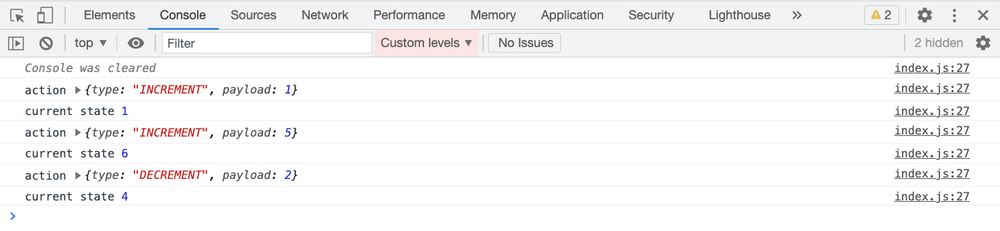
Before the action is dispatched to the store, the middleware gets executed as we can see the action logged to the console. Because we're calling the next function inside the `loggerMiddleware` by passing the action, the reducer will also be executed which results in the change in the store.
Now, what will happen If we don't call the next function inside the `loggerMiddleware`?
Then the action will not be sent to the reducer so the store will not be updated.
If you've worked with Node.js then you might find it similar to how middleware works in Node.js.
In Node.js middleware also, if we don't call the next function, the request will not be sent forward.
Here's an updated [Code Sandbox Demo](https://codesandbox.io/s/dry-dew-6ybfy?file=/src/index.js) with the removed next function call.
```js
const loggerMiddleware = (store) => (next) => (action) => {
console.log("action", action);
};
```
Here's a [preview link](https://6ybfy.csb.app/) for the above Code Sandbox demo.
If you check the console, you will see the following output:

As you can see, we only get the actions logged to the console. And as the action is not forwarded to the reducer, it will not be executed – so we don't see the console.log from the `store.subscribe` function.
As described earlier, we can modify the action from the middleware before it's sent to the reducer.
Here's an updated [Code Sandbox Demo](https://codesandbox.io/s/currying-cherry-nuupf?file=/src/index.js) where we're changing the payload of the action before it's sent to the reducer.
The code for the middleware looks like this:
```js
const loggerMiddleware = (store) => (next) => (action) => {
console.log("action", action);
action.payload = 3;
next(action);
};
```
Here's a [preview link](https://nuupf.csb.app/) for the above Code Sandbox demo.
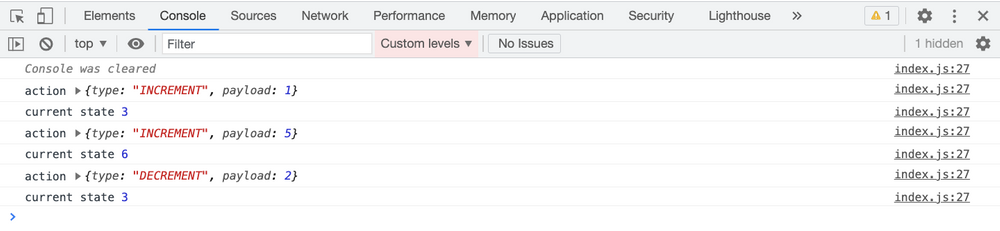
As per the code, once the action is logged to the console, we're setting the action payload to a value of 3. So the action type remains the same but the payload is changed.
So we see the state changed to 3 initially. Then again it's incremented by 3 which makes it 6. Finally, it's decremented by 3 making the final state value 3.
Before the action is sent to the reducer, our `loggerMiddleware` gets called where we're changing the payload value and we're always setting it to 3 before it's sent to the reducer. So based on the action type INCREMENT or DECREMENT, the reducer will always be changed by a value of 3.
Even though we're changing the action in the above code, there is no issue in this case because it's a middleware and not a reducer.
> Reducers should be a pure function and we shouldn't make any changes to state and action inside the reducer. You can learn more about it in detail in my [Mastering Redux Course](https://master-redux.yogeshchavan.dev/).
In the above code examples, we've created a single middleware. But you can create multiple middlewares and pass them to the `applyMiddleware` function like this:
```js
const middleware = applyMiddleware(loggerMiddleware, secondMiddleware, thirdMiddleware);
```
All the middlewares mentioned in the `applyMiddleware` function will be executed one after the other.
### Thanks for reading!
Check out my recently published [Mastering Redux](https://master-redux.yogeshchavan.dev/) course.
In this course, you will build 3 apps along with food ordering app and you'll learn:
* Basic and advanced Redux
* How to manage the complex state of array and objects
* How to use multiple reducers to manage complex redux state
* How to debug Redux application
* How to use Redux in React using react-redux library to make your app reactive.
* How to use redux-thunk library to handle async API calls and much more
and then finally we'll build a complete [food ordering app](https://www.youtube.com/watch?v=2zaPDfCKAvM) from scratch with stripe integration for accepting payments and deploy it to the production.
[ ](https://bit.ly/3w0DGum)
**Want to stay up to date with regular content regarding JavaScript, React, Node.js? [Follow me on LinkedIn](https://www.linkedin.com/in/yogesh-chavan97/).**
[
](https://bit.ly/3w0DGum)
**Want to stay up to date with regular content regarding JavaScript, React, Node.js? [Follow me on LinkedIn](https://www.linkedin.com/in/yogesh-chavan97/).**
[ ](https://www.buymeacoffee.com/myogeshchavan97)