# Refactoring Class Components to React Hooks Step By Step
In this article, we will explore why refactoring from class components to React Hooks is not straightforward in certain scenarios and how to convert it efficiently.
If you’re new to React Hooks, check out my previous article [here](https://blog.yogeshchavan.dev/a-complete-introduction-to-react-hooks) for the introduction to Hooks.
> Want to learn Redux in detail and build a complete food ordering app? check out my [Mastering Redux](https://master-redux.yogeshchavan.dev/) course. Following is the preview of the app, we'll be building in the course. It's a great project you can add to your portfolio/resume.
** Enroll for the course at just $12 instead of $19 until 26th May as a part of pre-launch offer.**
Note that, in this app, I have used INR as the currency for displaying the prices but you can easily change it to USD or AUD or any other currency with a single configuration change in the app.
%[https://www.youtube.com/watch?v=izSw74H08Bc]
### Let’s get started
Take a look at the below Code Sandbox demo which uses class components.
%[https://codesandbox.io/s/using-class-component-rp4eu]
The `App.js` code looks like this:
```js
import React from "react";
import Counter from "./Counter";
export default class App extends React.Component {
state = {
counter: 10
};
handleOnChange = event => {
this.setState({
counter: event.target.value
});
};
render() {
const { counter } = this.state;
return (
Start counting from
);
}
}
```
Here, we have a countdown timer that counts down from the specified value. Also, we have a dropdown that allows us to restart the timer with different values.
In the `Counter.js` component file, we have added a `startTimer` function which we are calling when the component is mounted and also when the dropdown value changes.
```js
startTimer = () => {
this.interval = setInterval(() => {
if (this.state.counter > 0) {
this.setState(prevState => {
return { counter: prevState.counter - 1 };
});
} else {
clearInterval(this.interval);
}
}, 1000);
};
```
Let’s convert the code from the `Counter.js` file to use React Hooks.
Inside the `Counter` component, declare the state using the `useState` hook which takes the value from `counter` prop.
```js
const [counter, setCounter] = useState(props.counter);
```
And add the `useEffect` hook to start the timer when the `counter` value changes.
```js
useEffect(() => {
const interval = setInterval(() => {
if (counter > 0) {
setCounter(prev => prev - 1);
} else {
clearInterval(interval);
}
}, 1000);
}, [counter]);
```
Here's an updated [Code Sandbox Demo](https://codesandbox.io/s/initialchange-vmtwm).
As you can see, the `counter` starts but it does not stop when it reaches zero value. Also, it does not count down correctly.
This is because the `setInterval` function inside the `useEffect` will be called on every 1000 milliseconds(1 second) so we need to clear the previous interval before it starts counting down again on the next interval.
```js
useEffect(() => {
const interval = setInterval(() => {
if (counter > 0) {
setCounter(prev => prev - 1);
} else {
clearInterval(interval);
}
}, 1000);
return () => clearInterval(interval);
}, [counter]);
```
As you might be aware that, when we return a function from the `useEffect` hook, it will be executed when the component is mounted and also before running that effect again so the below code inside the `useEffect` will clear the interval before the `useEffect` is called again.
```js
return () => clearInterval(interval);
```
Here's an updated [Code Sandbox Demo](https://codesandbox.io/s/clear-interval-ebc2h).
As you can see the `counter` correctly counts down and it also stops when it reaches zero.
Now let's add the code to restart the timer when we change the dropdown value.
To do that, we will separate out the setInterval functionality into a function so we can call that on component load and also when the dropdown value changes.
```js
const startTimer = () => {
const interval = setInterval(() => {
if (counter > 0) {
setCounter(prev => prev - 1);
} else {
clearInterval(interval);
}
}, 1000);
return () => clearInterval(interval);
};
useEffect(() => {
startTimer();
}, [startTimer]);
```
Here's an updated [Code Sandbox Demo](https://codesandbox.io/s/timer-function-h8v52).
As you can see in the above demo, after moving the code into a function, it does not work as expected, and we are getting a warning in the console.
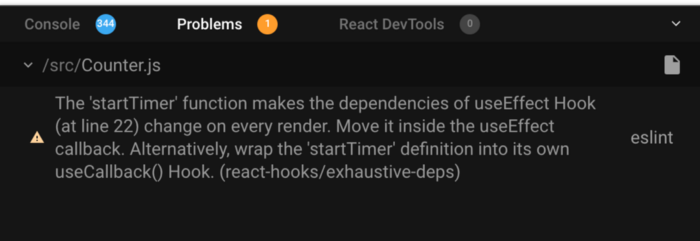
As the warning says, the `startTimer` function is getting executed continuously, so we need to wrap the `startTimer` function inside the `useCallback` hook.
The `useCallback` hook returns a memoized version of a function that will be executed only once. It also accepts the dependencies as a second parameter which works the same as the `useEffect` hook.
```js
const startTimer = useCallback(() => {
const interval = setInterval(() => {
if (counter > 0) {
setCounter(prev => prev - 1);
} else {
clearInterval(interval);
}
}, 1000);
return () => clearInterval(interval);
}, [counter]);
useEffect(() => {
startTimer();
}, [startTimer]);
```
Here's an updated [Code Sandbox Demo](https://codesandbox.io/s/usecallback-hook-y4m70).
As you can see we've wrapped the `startTimer` function inside the `useCallback` hook as suggested by the warning but the `counter` is still not stopping when it reaches value zero.
This is because we have specified the `counter` as a dependency for `useCallback`, so the `setInterval` function is getting created every time the `counter` changes. Also, the `counter` is not restarted when a dropdown value changes.
So the issue is with the `counter` variable as after it changes, the `useCallback` hook is getting called again.
So to fix that, we need a way to avoid the use of an external variable (`counter` in our case) inside the `useEffect` or `useCallback` hook. By avoiding the use of external variables we can minimize the number of dependencies and the effect will not run multiple times.
One way to do this is to use the updater function syntax for setting the state.
```js
const startTimer = () => {
setInterval(() => {
console.log("inside startTimer");
setCounter(prev => {
return prev > 0 ? prev - 1 : prev;
});
}, 1000);
};
useEffect(() => {
setCounter(props.counter);
startTimer();
}, [props.counter]);
```
Here's a [Code Sandbox Demo](https://codesandbox.io/s/using-updater-function-w90sk).
Here, inside the `setCounter` function, we're checking the previous value of the `counter` and based on that we're decrementing it by one if it's greater than zero.
As you can see, the counter is correctly getting decremented and also getting restarted when the dropdown value is changed.
Here, we are using the updater function syntax to get the previous state of the `counter` value and also moved the if condition inside the `setCounter` function so we will always get the updated value while returning a new state.
One thing you will notice is that the `setInterval` function is still getting called even when the `counter` reaches zero as can be seen in the console, so we need to clear the interval.
To do this, we need to use the `useRef` hook so we can access the interval timer value outside the `startTimer` function.
```js
const counterRef = useRef();
useEffect(() => {
if (counter === 0) {
clearInterval(counterRef.current);
}
}, [counter]);
useEffect(() => {
clearInterval(counterRef.current);
setCounter(props.counter);
startTimer();
}, [props.counter]);
const startTimer = () => {
counterRef.current = setInterval(() => {
console.log("inside interval");
setCounter(prev => {
return prev > 0 ? prev - 1 : prev;
});
}, 1000);
};
```
Here's a [Code Sandbox Demo](https://codesandbox.io/s/final-working-countdown-z27wu).
Here, we've saved the value returned by `setInterval` function inside the `startTimer` function in the `counterRef.current`.
So using ref, in this case, will retain its value even after multiple re-renders of the component.
And that ref value we're using inside the first and second `useEffect` hook to clear the interval.
```js
clearInterval(counterRef.current);
```
So now the code is working correctly and the same as our class component demo.
### Thanks for reading!
Check out my recently published [Mastering Redux](https://master-redux.yogeshchavan.dev/) course.
In this course, you will learn:
* Basic and advanced Redux
* How to manage the complex state of array and objects
* How to use multiple reducers to manage complex redux state
* How to debug Redux application
* How to use Redux in React using react-redux library to make your app reactive.
* How to use redux-thunk library to handle async API calls and much more
and then finally we'll build a complete [food ordering app](https://www.youtube.com/watch?v=izSw74H08Bc) from scratch with stripe integration for accepting payments and deploy it to the production.
[](https://bit.ly/3w0DGum)
**Want to stay up to date with regular content regarding JavaScript, React, Node.js? [Follow me on LinkedIn](https://www.linkedin.com/in/yogesh-chavan97/).**
[](https://www.buymeacoffee.com/myogeshchavan97)
 ](https://bit.ly/3w0DGum)
**Want to stay up to date with regular content regarding JavaScript, React, Node.js? [Follow me on LinkedIn](https://www.linkedin.com/in/yogesh-chavan97/).**
[
](https://bit.ly/3w0DGum)
**Want to stay up to date with regular content regarding JavaScript, React, Node.js? [Follow me on LinkedIn](https://www.linkedin.com/in/yogesh-chavan97/).**
[ ](https://www.buymeacoffee.com/myogeshchavan97)