# Run Any React/Angular/Vuejs Project Directly From Github Repository
## Remove the hassle of downloading or cloning the repository code
Want to run any Javascript or Framework project directly from the GitHub repository without downloading it on your machine?
Is it possible?
The answer is big **“YES”**
I just came across a service provided by **Gitpod.io** which is an online IDE for running GitHub projects in the cloud.
To run any project from GitHub in browser
1. Copy the URL of the GitHub project you want to run
2. Append it to [http://gitpod.io/#](http://gitpod.io/#)
3. Log in to your GitHub account by clicking on “Login with GitHub & launch workspace” button
4. You’re done. It will load your environment of VS Code in the cloud
Let’s take the calculator project mentioned as the first project in [https://reactjs.org/community/examples.html](https://reactjs.org/community/examples.html)
To run the project in browser take the repository URL which is [https://github.com/ahfarmer/calculator](https://github.com/ahfarmer/calculator) and append it to [http://gitpod.io/#](http://gitpod.io/#)
So the complete URL becomes
[https://gitpod.io/#https://github.com/ahfarmer/calculator](https://gitpod.io/#https://github.com/ahfarmer/calculator)
If you load the above URL, it will load the Visual Studio Code IDE in the cloud and you can run the project there, by running “npm install” and then “npm start” in the VS Code terminal as instructed in the `README.md` file for that project.
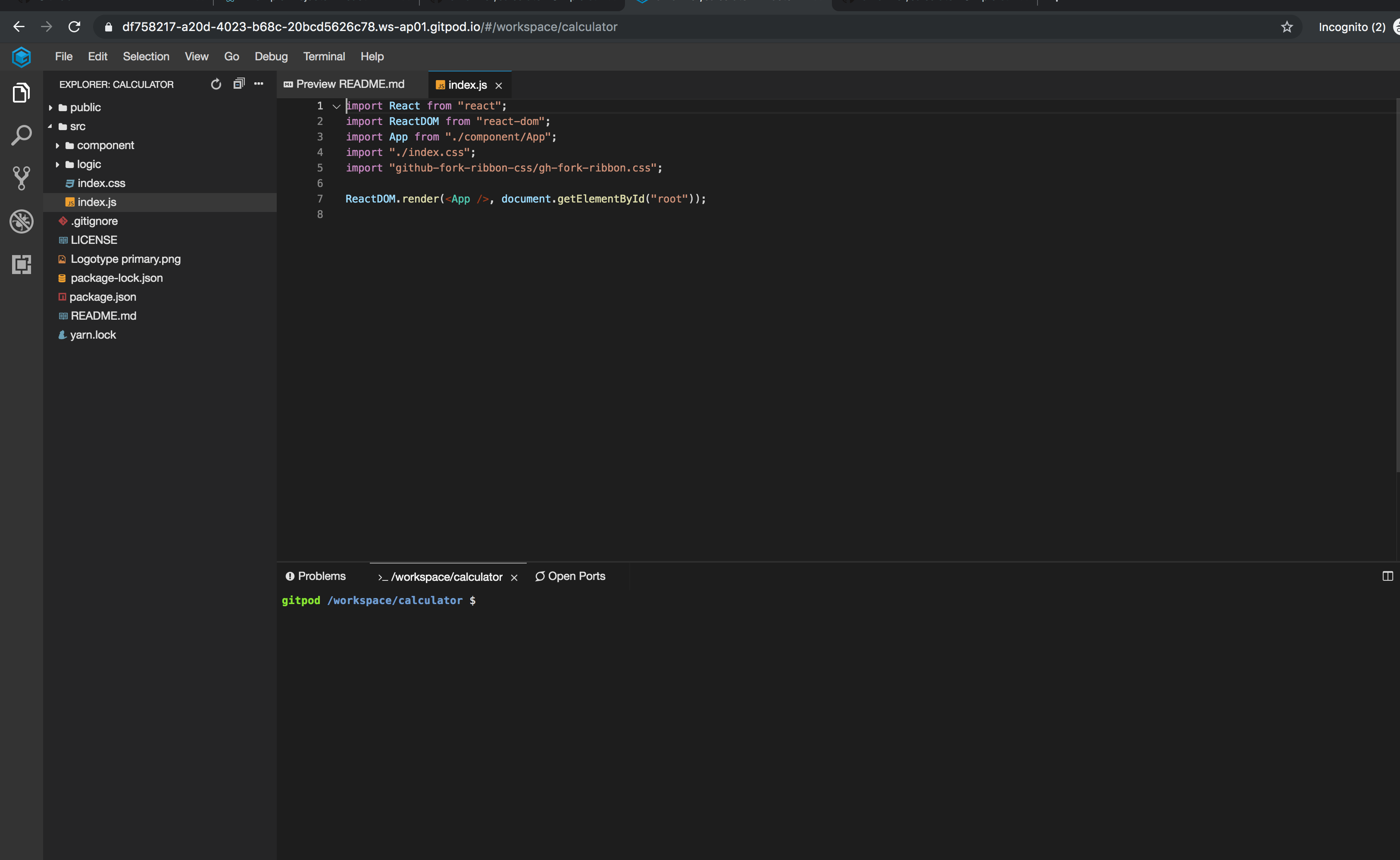
Following is the preview of how it looks when the URL is loaded
GitPod Environment
Using this technique, you can run the project, test it, and can also modify it as it's in the cloud.
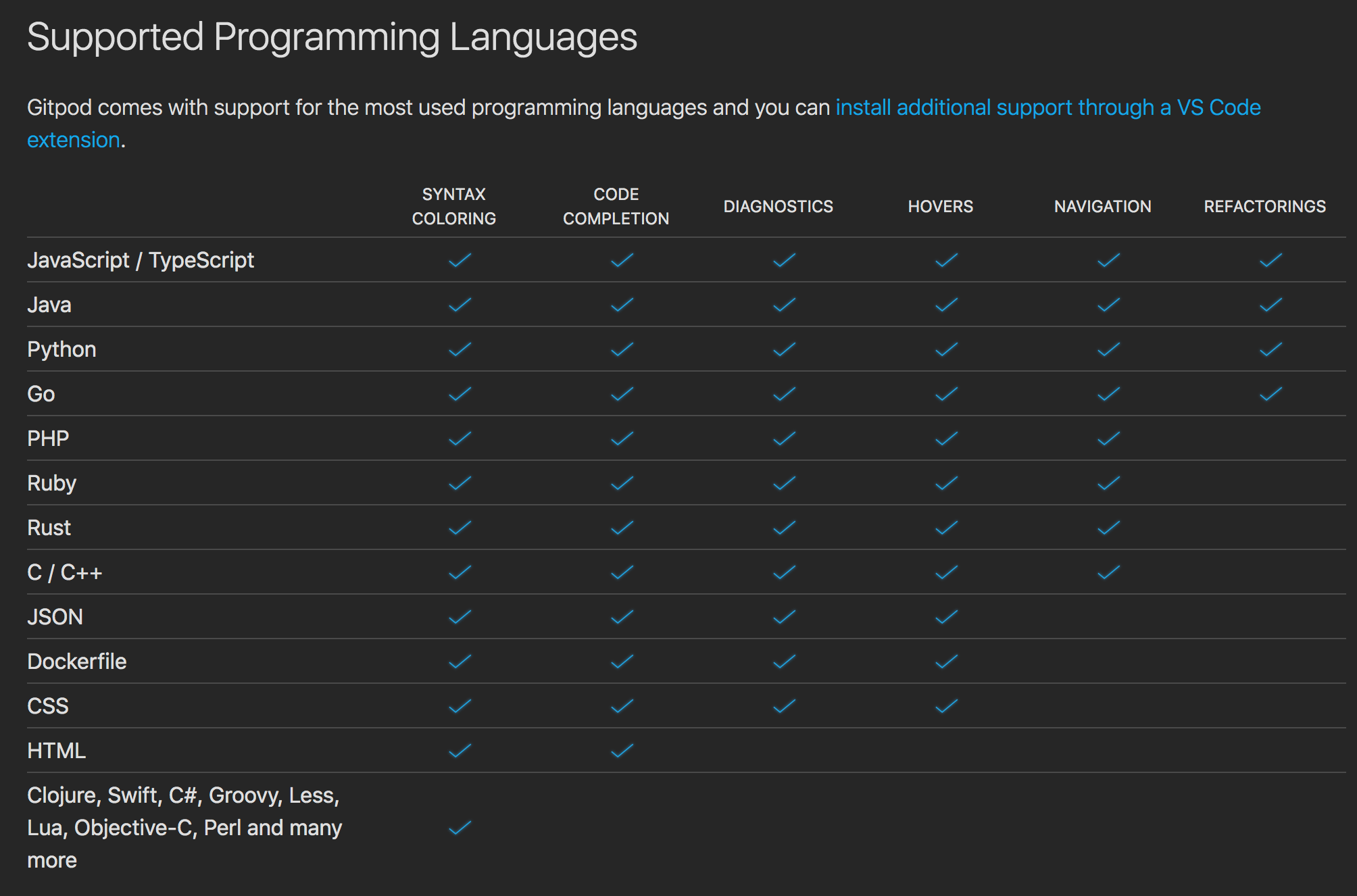
> The GitPod allows to run code of almost all the languages that are supported by Visual Studio Code including Javascript, Python, Java and Go
Following is the list of supported languages from gitpod website.
Obviously, Gitpod is not completely free, the following chart shows the pricing plan

Pricing Plan
**Free 50 hours/month**
I think that is more than enough for what you need.
That’s it for today. Hope you enjoyed the article and learned something new today.
I hope you've been enjoying my articles and tutorials I've been writing. If you found them useful, consider buying me a coffee! I would really appreciate it.
[](https://www.buymeacoffee.com/myogeshchavan97)
**Don’t forget to subscribe to get my weekly newsletter with amazing tips, tricks, and articles directly in your inbox** [**here**](https://yogeshchavan.dev)**.**
 GitPod Environment
Using this technique, you can run the project, test it, and can also modify it as it's in the cloud.
> The GitPod allows to run code of almost all the languages that are supported by Visual Studio Code including Javascript, Python, Java and Go
Following is the list of supported languages from gitpod website.
GitPod Environment
Using this technique, you can run the project, test it, and can also modify it as it's in the cloud.
> The GitPod allows to run code of almost all the languages that are supported by Visual Studio Code including Javascript, Python, Java and Go
Following is the list of supported languages from gitpod website.
 Obviously, Gitpod is not completely free, the following chart shows the pricing plan

Pricing Plan
**Free 50 hours/month**
I think that is more than enough for what you need.
That’s it for today. Hope you enjoyed the article and learned something new today.
I hope you've been enjoying my articles and tutorials I've been writing. If you found them useful, consider buying me a coffee! I would really appreciate it.
[
Obviously, Gitpod is not completely free, the following chart shows the pricing plan

Pricing Plan
**Free 50 hours/month**
I think that is more than enough for what you need.
That’s it for today. Hope you enjoyed the article and learned something new today.
I hope you've been enjoying my articles and tutorials I've been writing. If you found them useful, consider buying me a coffee! I would really appreciate it.
[ ](https://www.buymeacoffee.com/myogeshchavan97)
**Don’t forget to subscribe to get my weekly newsletter with amazing tips, tricks, and articles directly in your inbox** [**here**](https://yogeshchavan.dev)**.**
](https://www.buymeacoffee.com/myogeshchavan97)
**Don’t forget to subscribe to get my weekly newsletter with amazing tips, tricks, and articles directly in your inbox** [**here**](https://yogeshchavan.dev)**.**