Super Useful Tips & Tricks for JavaScript Developers

Quick way to mask numbers using slice and ES8 padStart method
const creditCard = "4111111111114321"; // 16 digit credit card number
const lastFourDigits = creditCard.slice(-4); // get last 4 digits

// prepend * to lastFourDigits to make length equal to creditCard number length
const maskedNumber = lastFourDigits.padStart(creditCard.length, '*');

console.log(lastFourDigits); // 4321
console.log(maskedNumber); // ************4321
Execute an event handler only once
By passing { once: true } as the third argument to the addEventListener method, the event handler function will be executed only once.
document.getElementById("btn").addEventListener("click",
  function () {
    console.log("Button clicked!");
  },
  { once: true }
);
Update properties of an object using spread operator
const user = {
  name: 'David',
  age: 30,
  city: 'NY'
};

const newAge = 40;

const updatedUser = {
  ...user,
  age: newAge
};

console.log(user); // { name: 'David', age: 30, city: 'NY'}
console.log(updatedUser); // { name: 'David', age: 40, city: 'NY'}
Find the number of properties in an object
const user = {
  name: 'David',
  age: 30,
  city: 'NY'
};

console.log(Object.keys(user).length); // 3
Get the last elements from the array
const numbers = [10, 20, 30, 40, 50];
const last = numbers.slice(-1);
console.log(last); // [50]

const secondLast = numbers.slice(-2);
console.log(secondLast); // [40, 50]
Note that, slice method is available for the array as well as string.
Three ways to check If the provided array is actually an array
In JavaScript, array is also an object so to check If it's actually an array or object you can use the following 3 ways. (Popular Interview Question)
const arr = [1, 2, 3, 4];
arr.constructor.toString().indexOf("Array") > -1
arr instanceof Array
Array.isArray(arr)
Get current timestamp
const date = new Date();
console.log(date.getTime()); // 1621708197268
The timestamp value is sometimes useful for generating unique values because the timestamp value is always different for every second.
Provide a dynamic key for an object using ES6 computed object property syntax
// old way
function getPairs(key, value) {
  var object = {};

  object[key] = value

  return object;
}

console.log(getPairs('name', 'Mike')); // { name: 'Mike'}
console.log(getPairs('age', '40')); // { age: 40}

// new ES6 way
function getPairs(key, value) {
  const object = {
    [key]: value
  };

  return object;
}

console.log(getPairs('name', 'Mike')); // { name: 'Mike'}
console.log(getPairs('age', '40')); // { age: 40}
Object destructuring
const user = {
 name: 'David',
 age: 30
};

// destructure user properties and use a `status` property with value `Married` If it does not exist
const {name, age, status = 'Married' } = user;
console.log(name, age, status) // David 30 Married

const person = {
 age: 30
};

// destructure `person` object and rename `name` to `username` and assign a default value of `Anonymous`, If the property does not exist in the `person` object
const {name: username = 'Anonymous', age } = person;

console.log(username, age); // Anonymous 30
Array destructuring
const days = ["sunday", "monday", "tuesday", "wednesday", "thursday", "friday", "saturday"];

const [firstDay, secondDay] = days;

console.log(firstDay); // sunday
console.log(secondDay); // monday
Using ES6 template literal syntax
const user = {
 name: 'David',
 age: 30,
 address: 'NY'
};

// old way: Hi, I'm David with age 30 and living in NY
console.log("Hi, I'm " + user.name + " with age " + user.age + " and living in " + user.address);

// new way: Hi, I'm David with age 30 and living in NY

console.log(`Hi, I'm ${user.name} with age ${user.age} and living in ${user.address}`);
This can be further simplified as shown below:
const user = {
 name: 'David',
 age: 30,
 address: 'NY'
};

const { name, age, address } = user;
console.log(`Hi, I'm ${name} with age ${age} and living in ${address}`);
Pass variable number arguments to a function
ES6 rest operator (...) converts comma-separated values into an array so the numbers parameter of the add function becomes an array.
function add(...numbers) {
 return numbers.reduce((acc, value) => {
   return acc + value;
 }, 0);
}

const sum = add(1, 2, 3, 4, 5);
console.log(sum); // 15
Using spread operator to create a new array
const first = ["two", "three", "four"];
const second = [ "six", "seven", "eight"];

const combined = ["one", ...first, "five", ...second]
console.log(combined); // ["one", "two", "three", "four", "five", "six", "seven", "eight"]
Fill the array with a specific value
const array = Array(5).fill(false); // [false, false, false, false, false]
const array = [...Array(5).keys()] // [0, 1, 2, 3, 4, 5]
Remove duplicates from the array
- Using Set
const array = [1, 2, 2, 3, 1, 5];

const unique = [...new Set(array)];

console.log(unique); // [1, 2, 3, 5];
- Using array filter method
const array = [1, 2, 2, 3, 1, 5];

const unique = array.filter((value, index) => {
    return array.indexOf(value) === index;
});

console.log(unique); // [1, 2, 3, 5]
Generate random number within a particular range
- random number from 0 to 100:
Math.floor(Math.random() * 100)
- random number from 1 to 100
Math.floor(Math.random() * 100) + 1
- random number between min (included) and max (excluded)
function getRandom(min, max) {
  return Math.floor(Math.random() * (max - min) ) + min;
}

console.log(getRandom(10, 35)); // any random number >= 10 and < 35
- random number between min and max (both included)
function getRandom(min, max) {
  return Math.floor(Math.random() * (max - min + 1) ) + min;
}

console.log(getRandom(10, 35)); // any random number >= 10 and <= 35
Print JSON in a formatted way
const book = {"date": "2019–03–22","book": "Harry potter","author": "J.K.Rowling"};
console.log(JSON.stringify(book, null, 2)) // formatted with 2 spaces
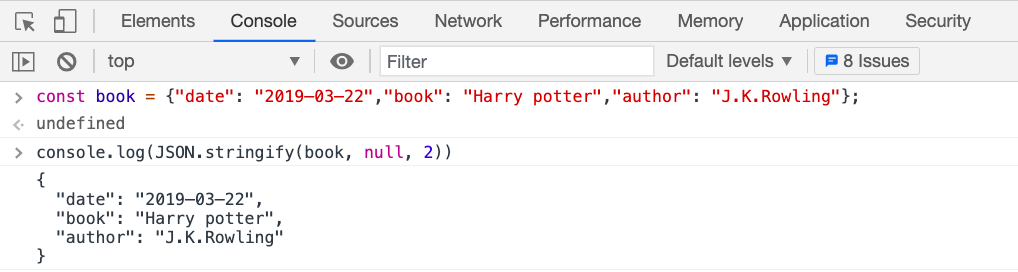
const book = {"date": "2019–03–22","book": "Harry potter","author": "J.K.Rowling"};
console.log(JSON.stringify(book, null, '\t')) // formatted with tabs
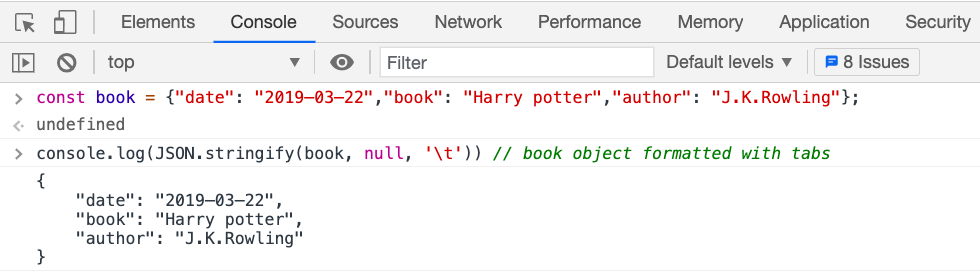
Implement smooth scroll to the top of the page
window.scrollTo({ top: 0, left: 0, behavior: "smooth" });
Convert any value to boolean
let number1;
console.log(!!number1); // false

const number2 = 10;
console.log(!!number2); // true

const name1 = 'Tim';
console.log(!!name1); // true

const name2 = '';
console.log(!!name2); // false

const nullValue = null;
console.log(!!nullValue); // false
This is especially useful If you want to avoid sending null or undefined as a value to the backend.
Quickly convert string to number
const number = "20";
const converted = +number;

console.log(converted); // 20
Convert string to array
const name = "Mike johnson";
console.log(name.split("")); // ["M", "i", "k", "e", " ", "j", "o", "h", "n", "s", "o", "n"]

const chars = "a,b,c,d,e,f";
console.log(chars.split(",")); // ["a", "b", "c", "d", "e", "f"]
Format number to two decimal places
const number = 100.32222;
console.log(number.toFixed(2)); // 100.32
Check if the array contains a specific value
const numbers = [1, 2 ,3, 10, 50];

// old way
console.log(numbers.indexOf(3) > -1); // true as it check if 3 is present in the array

// new way
console.log(numbers.includes(3)); // true
The includes method is also useful when comparing multiple values at once.
const day = "monday";
if(day === "monday" || day === "tuesday" || day === "wednesday" || day === "thursday") {
  // do something
}

// The above code is the same as the below code

const day = "monday";
if(["monday", "tuesday", "wednesday", "thursday"].includes(day)) {
  // do something
}
Using optional chaining operator
const user = {
  name: 'David',
  location: {
    street: {
      number: 20,
      name: '11 wall street'
    }
  }
};

// old way
const streetName = user.location && user.location.street && user.location.street.name;
console.log(streetName); // 11 wall street

// new way
const streetName = user?.location?.street?.name;
console.log(streetName); // 11 wall street
Previously, to access the nested property we need to check for each property If it exists or not because directly accessing user.location.street.name will throw an error If the location or street property does not exist and we try to access name on it like this:
const user = {
  name: 'David'
};

const streetName = user.location.street.name; // Uncaught TypeError: Cannot read property 'street' of undefined
But now with the ES11 optional chaining operator, the next code after ?. will be executed only if the previous reference is not undefined or null so we don't get any error.
const user = {
  name: 'David'
};

const streetName = user?.location?.street?.name;
console.log(streetName); // undefined
So using the optional chaining operator makes the code shorter and easier to understand.
Thanks for reading!
Want to learn Redux in detail and build a complete food ordering app? check out my Mastering Redux course.
Following is the preview of the app, we'll be building in the course. It's a great project you can add to your portfolio/resume.
Note that, in this app, I have used INR as the currency for displaying the prices but you can easily change it to USD or AUD or any other currency with a single configuration change in the app.
Want to stay up to date with regular content regarding JavaScript, React, Node.js? Follow me on LinkedIn.

About the author
Full Stack Developer | Freelancer | JavaScript | React | Nodejs.
Loves sharing knowledge through technical articles.
Dev.to: https://dev.to/myogeshchavan97
https://linktr.ee/myogeshchavan97
Comments
Join the discussionHey Yogesh Chavan
Good tips thanks. By the way, I can add my two cents to your article.
- In getting the last element of the array section, in the first example
arr.slice(-1)will return[50]not the value50. - For checking if it is an array I guess we can also use below code
const isArray = Object.prototype.toString.call(arr) == "[object Array]"
Chety Thanks for pointing out my mistake. I have updated the article.
And thanks for mentioning another way for Array type check.
Yogesh Chavan Thanks for sharing helpful about js.
This article is so useful, cause I recently had an array with something like arr = [ {name: foo, count:2}, {name2: doe, count:5} ] and I wanted to convert all count values to percentage while maintaining names as they're and get results into a new array, I think the add function and dynamic object trick you have provided here can make it work, I just haven't figured it out. But in all this is awesome, thanks!
Thanks Hussein Kizz. Glad this article was useful to you. But I think I have not understood what you're trying to do. Are you trying to add all count values to calculate the percentage?
oh yeah Yogesh Chavan thanks, I was trying to do that but I shouted out on the tech twitter community and got help. it's using Array reduce and map and get it to work, here is the tweet: https://twitter.com/HusseinKizz/status/1396586056267407362
Hussein Kizz It's great to hear that you've finally solved the issue


