# What is Context API in React and How to use it in React App
## What is Context?
> Context provides a way to pass data through the component tree without having to pass props down manually at every level.
So If we have a parent component with child components inside it and each child component has further child components, then to pass data from the parent component to the innermost child component we have to pass it through all the parent components of the innermost child component. This is known as `prop drilling`.
This means even if any component is not using that prop, it has to receive that prop to pass it down to the child component. So to avoid this long chain of passing props through each level, we can use context API provided by React.
So using Context API, the innermost child can directly access the prop data sent from the parent component just like the `connect` method of `react-redux` library.
That’s enough for details. Let’s start with code to understand it better.
---
Clone the project from [this repository](https://github.com/myogeshchavan97/user-search-app) which is created in [this article](https://medium.com/javascript-in-plain-english/how-to-build-user-search-app-in-react-5bf1eff63657?source=friends_link&sk=8ad8a8a973526eb028af1cf5d958e314).
To run the application, execute the following commands in sequence
1. yarn install
2. yarn start
If you check the JSX returned from `src/components/HomePage.js` file, it looks like this:
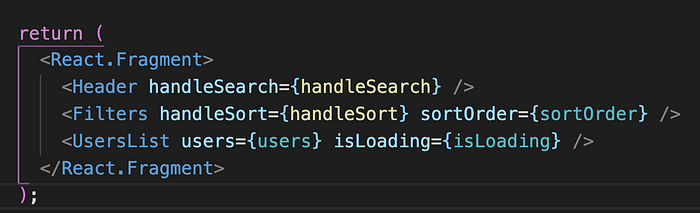
If you see, the `UsersList` component accepts `users` and `isLoading` props and the `Filters` component accepts `handleSort` and `sortOrder` prop.
If we have child components inside `Filters` or `UsersList` component which also needs these props, we have to pass them down from these components. So instead of passing those as props, we can access them using Context API.
**There are 2 ways we can access the props passed from the context in React. Let’s start with the first approach.**
## Using render props pattern
Create a new `context` folder inside the `src` folder and add `UserContext.js` file inside it with the following code:
```js
import React from 'react';
const UserContext = React.createContext();
export default UserContext;
```
Here, we are creating a `UserContext` variable which we can use to access the data passed from the parent component
Now, in `HomePage.js`, import the `UserContext` we just created at the top:
```js
import UserContext from '../context/UserContext';
```
The `React.createContext()` function call returns an object with two properties, `Consumer` and `Provider` which we can access directly from `UserContext` variable as `UserContext.Consumer` and `UserContext.Provider` or using destructuring as shown below:
```js
const { Consumer, Provider } = UserContext;
```
So now, change the JSX returned in `HomePage` component from this code:
```jsx
```
to this code:
```jsx
```
The `Provider` component accepts props inside value prop where we can pass all the props that we need to access in the components mentioned in between the opening and closing tag.
So now `Header`, `Filters` and `UsersList` component can directly access the props we have provided in value prop.
Now, to access the `sortOrder` prop inside the `Filters` component, we need to change the returned JSX in `Filters.js` from this code:
```jsx
Sort by age
```
to this code:
```jsx
{(props) => (
Sort by age
)}
```
Here, In between the opening and closing tag of `UserContext.Consumer`, we provide a function for which the props we passed from `HomePage.js` will become automatically passed.
```jsx
```
So the props will contain all the props passed such as `users`, `sortOrder` and `isLoading`. We need only `sortOrder` prop in `Filters.js` so we can use destructuring here to further simplify it as:
```jsx
{({ sortOrder }) => (
Sort by age
)}
```
%[https://gist.github.com/myogeshchavan97/d9bf8141183fefd6fa492272253ffcdb]
Now, we will access the `isLoading` and `users` prop inside `UsersList` component
Change `UsersList` component from this code:
```jsx
const UsersList = ({ users, isLoading }) => {
return (
)}
);
};
```
Note, we have removed the props passed in the component and we are accessing it inside the `UserContext.Consumer` render prop.
So we are accessing the `isLoading` and `users` props passed from the Context provider which is directly passed to the function defined in between the `UserContext.Consumer`.
%[https://gist.github.com/myogeshchavan97/a0e980af23f70b85af7c360c83569f88]
The pattern of defining a function in between the opening and closing tag is known as the `render props pattern`.
You can find complete source code until this point [here](https://github.com/myogeshchavan97/react-context-demo/tree/using-render-props).
## Using useContext hook
The React hooks API provides an easy way of accessing the passed props from consumer so there is no need of using render props pattern where we create a function to get the props values.
Just to recap, we pass the value prop to `UserContext.Provider` as:
```jsx
```
Here, we are passing the object to the value prop with `users`, `sortOrder` and `isLoading` properties.
So we can access these object properties by using `useContext` hook as below:
```js
import { useContext } from 'react';
import UserContext from '../context/UserContext';
const { users, sortOrder, isLoading } = useContext(UserContext);
```
Here, we have provided the `UserContext` we created in `UserContext.js` to `useContext` hook as a parameter.
So to access `sortOrder` inside the `Filtes.js` file, we can just use:
```js
const { sortOrder } = useContext(UserContext);
```
%[https://gist.github.com/myogeshchavan97/a80b698f75079633e75e3cc847ec5065]
and in `UsersList.js`, we can access the `users` and `isLoading` prop values as
```js
const { users, isLoading } = useContext(UserContext);
```
%[https://gist.github.com/myogeshchavan97/0a00fceb0637a85b919e4d95b7f0752d]
> Note: You can use the `useContext` hook to access props only in functional components and not in class based components. If you are using class based components, you have to use the render props pattern.
You can find complete source code for `useContext` hook functionality [here](https://github.com/myogeshchavan97/react-context-demo/tree/using-usecontext-hook).
## Conclusion
React provides an easy way to avoid prop drilling using Context API. There are two ways to access the passed props. The first is using `render props pattern` and the second is using `useContext` hook.
Note that, we have just passed `users`, `sortOrder` and `isLoading` in the value prop. If you want you can even pass the `handleSort` and `handleSearch` handlers in the value prop. There is no problem with doing that.
Also, If you have nested children like parent component contains child component and that child component contains another child component and the innermost child is using the state or props of parent component, then only you should use context otherwise you can just directly pass props.
Context just provides a better way to access props directly in the innermost child without the need of passing the props through each child to reach the innermost child.
**You can find the initial source code [here](https://github.com/myogeshchavan97/react-context-demo), code for context using render props [here](https://github.com/myogeshchavan97/react-context-demo/tree/using-render-props) and code for context using useContext [here](https://github.com/myogeshchavan97/react-context-demo/tree/using-usecontext-hook).**
### Thanks for reading!
Want to learn all ES6+ features in detail including let and const, promises, various promise methods, array and object destructuring, arrow functions, async/await, import and export and a whole lot more from scratch?
Check out my [Mastering Modern JavaScript](https://modernjavascript.yogeshchavan.dev/) book. This book covers all the pre-requisites for learning React and helps you to become better at JavaScript and React.
**Check out free preview contents of the book [here](https://www.freecodecamp.org/news/learn-modern-javascript/).**
Also, you can check out my **free** [Introduction to React Router](https://yogeshchavan.podia.com/react-router-introduction) course to learn React Router from scratch.
Want to stay up to date with regular content regarding JavaScript, React, Node.js? [Follow me on LinkedIn](https://www.linkedin.com/in/yogesh-chavan97/).
[](https://bit.ly/3w0DGum)
[](https://www.buymeacoffee.com/myogeshchavan97)
 ](https://bit.ly/3w0DGum)
[
](https://bit.ly/3w0DGum)
[ ](https://www.buymeacoffee.com/myogeshchavan97)