Surprising behavior of for...in loop

In this article, we will see how to use for...in loops to avoid unpredictable bugs.
Take a look at the below code:
const user = { name: 'David', age: 30 };
for (key in user) {
 console.log(user[key]);
}
Can you predict the output of the above code?
The output will be:
David
30
which is as expected.
Now take a look at the below code:
const user = { name: 'David', age: 30 };
Object.prototype.color = 'red';

Object.prototype.display = function() {};
for (key in user) {
 console.log(user[key]);
}
What will be the output now?
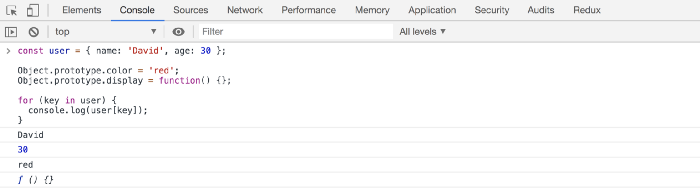
So it prints the color property and display function also, which is obviously not what we expected.
So if somewhere in your code, you or someone has added some properties or methods to the Object prototype, they will be displayed when using a for...in loop.
This means the for...in loop will display its own properties and also its prototype properties.
We can fix this using the hasOwnProperty method.
Object.prototype.hasOwnProperty
It has the following syntax:
obj.hasOwnProperty(prop)
The method returns true if the prop provided is the obj’s own declared property.
const user = { name: 'David', age: 30 };
Object.prototype.color = 'red';
Object.prototype.display = function() {};

for (key in user) {
 if (user.hasOwnProperty(key)) {
  console.log(user[key]);
 }
}
Now, the output will come as expected.
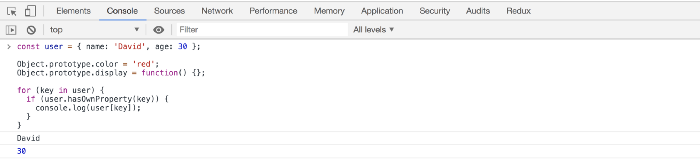
There is another way to fix this issue using the Object.keys method and using the for...of loop.
Object.keys
It has the following syntax:
Object.keys(obj)
This method returns an array of a given object’s own enumerable property names.
const user = { name: 'David', age: 30 };
Object.prototype.color = 'red';
Object.prototype.display = function() {};

for (key of Object.keys(user)) {
 console.log(user[key]);
}
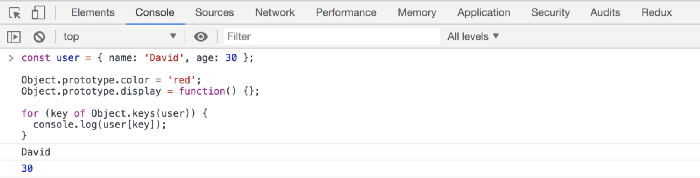
So you might need to take note of these things when using the for...in loop.
Thanks for reading!
Check out my recently published Mastering Redux course.
In this course, you will build 3 apps along with a food ordering app and you'll learn:
- Basic and advanced Redux
- How to manage the complex state of array and objects
- How to use multiple reducers to manage complex redux state
- How to debug Redux application
- How to use Redux in React using react-redux library to make your app reactive.
- How to use redux-thunk library to handle async API calls and much more
and then finally we'll build a complete food ordering app from scratch with stripe integration for accepting payments and deploy it to the production.

Want to stay up to date with regular content regarding JavaScript, React, Node.js? Follow me on LinkedIn.

About the author
Full Stack Developer | Freelancer | JavaScript | React | Nodejs.
Loves sharing knowledge through technical articles.
Dev.to: https://dev.to/myogeshchavan97
https://linktr.ee/myogeshchavan97
Comments
Join the discussionNo comments yet. Be the first to comment.


